Open source Native Windows 11 Local only
AI coding limits,
native to Windows 11.
CodexWinBar lives inside your taskbar and shows live provider usage at a glance. Click the widget to open a native Windows flyout with resets, pace, and credits.
- Runs locally, no CodexWinBar account
- Open source under MIT
- Built for Windows 11
 Claude
Max
Claude
Max
Updated just now
 W 84%
65% · W 37%
W 84%
65% · W 37%
- 3FlyoutSession, weekly, Fable 5, and credits.
- 2WidgetLive usage seated inside the rail.
- 1TaskbarYour own Windows 11 taskbar.
Widget density
See more.
Or keep it minimal.
Three densities decide how much of the signal reaches the rail. Every mode is the same live data — only the amount of it changes.
W 84%
65% · W 37%
65% · W 37%
W 84%
65%
The widget keeps its place in the rail at every density, so the numbers land in the same spot every time you look down.
Flyout anatomy
Everything you need,
when you need it.
One click opens a native flyout with the exact fields the provider returns — usage, reset timers, pace against the window, and the credit balance.
- Provider & planThe connected account and its plan.
- Usage metersEach window fills as you work.
- Reset timersThe exact time left in the window.
Claude
Max
Updated just now
- PaceUnder or over the pace of the window.
- CreditsThe balance available for extra usage.
- ActionsRefresh, settings, and close.
- Rolling windows
- Session and model windows move continuously, so the timer counts down from your last use.
- Fixed windows
- Weekly windows reset on the provider's calendar, and the flyout shows the time remaining.
- Reported, not guessed
- Percentages, timers, and credits come straight from the provider response.
Connected inputs
Connect only
what you use.
A fresh install connects nothing. Add a provider and CodexWinBar reports only the fields that provider makes available.
| Provider | Connection | What it can report | State |
|---|---|---|---|
| Codex | Browser OAuth | Usage windows, resets, credits | Available |
| Claude | Browser OAuth | Session, weekly, model window, credits | Available |
 GitHub Copilot GitHub Copilot | GitHub device flow | Copilot quota snapshots | Available |
 Gemini Gemini | Gemini CLI OAuth | Available model quota buckets | Available |
 OpenRouter OpenRouter | API key | Credits and per-key limits | Available |
| OpenAI Admin | Admin API key | Organization cost reporting | Available |
 z.ai z.ai | API key | Coding-plan quota data | Available |
 Cursor Cursor | Session cookie | Plan and Composer usage | Experimental |
Provider names and logos belong to their respective owners. Integration does not imply endorsement or partnership. Endpoints and available fields can change.
Settings & notifications
Quiet by default.
Clear when it matters.
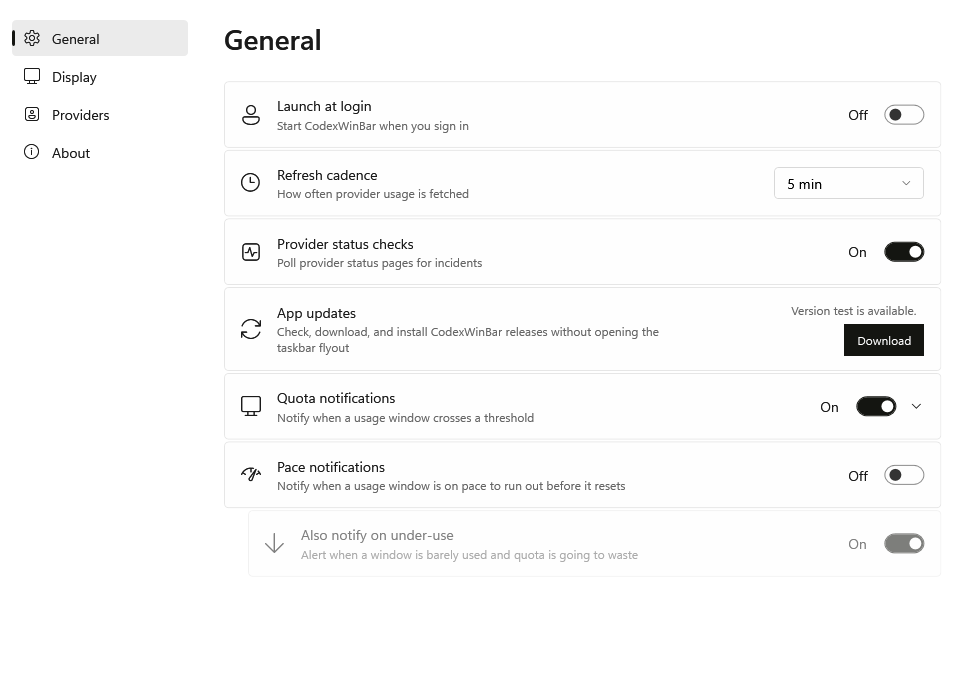
Set your refresh cadence once. Turn on only the notifications that earn their place, and CodexWinBar stays out of the way for everything else.
- ThresholdKnow when a window crosses the level you chose.
- PaceCatch a window that is running ahead of its reset.
- Under-useAn optional nudge when an allowance is going to waste.
Local by design
Your data never
leaves your machine.
No CodexWinBar account. No CodexWinBar server. No analytics, no telemetry, no sync. Requests go straight from your PC to the providers you connected.
 CodexWinBarWindows 11, your machine
One command
Install with Winget.
One line.
Winget downloads and verifies the latest package, then installs CodexWinBar for your Windows account.
winget install CodexWinBar --interactive
Verified by Winget: Windows Package Manager checks the published installer hash before running it. The standalone Setup.exe remains available as a secondary option.
Open source
Built in the open.
Built to last.
A native Windows rebuild of CodexBar, written in C# on .NET with WPF and Win32 for the taskbar and flyout.
- Language
- C# / .NET 9
- Interface
- WPF + Win32
- Platform
- Windows 11 x64
- License
- MIT
- Upstream
- CodexBar by Peter Steinberger
- Windows port
- Itay Cohen
Back to focus
One click from insight.
Then out of the way.
Keep the signal where you already look. Open the detail only when you need it.